Event-specific training
Build the right session for sprints, hurdles, distance, throws, jumps, pole vault, combined events, and strength.
 Track Command
Run the whole track and field program: capture field attempts, time running groups, and keep meets, results and coaching staff together. Enable the tools your program needs.
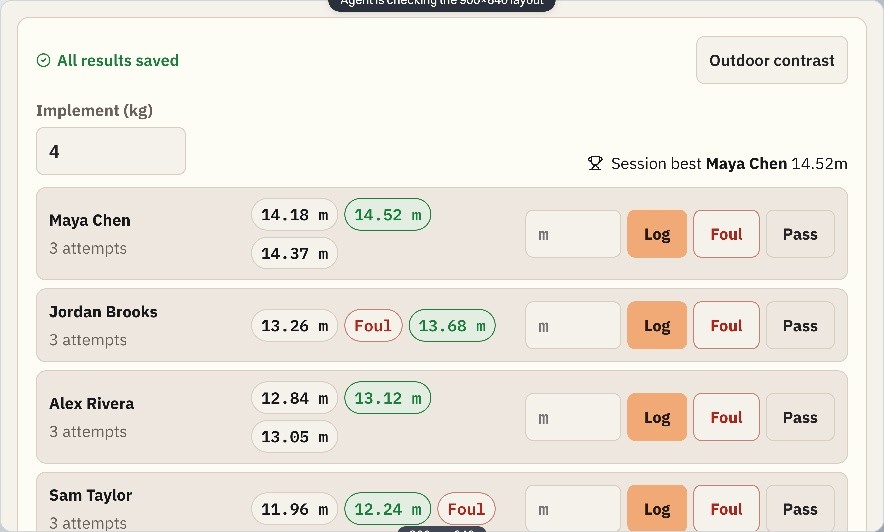
Each discipline gets the tools it needs without turning the rest of the app into clutter.
Build the right session for sprints, hurdles, distance, throws, jumps, pole vault, combined events, and strength.
Keep rosters, training groups, staff access, calendars, wellness, and schedules organized in one program.
Connect meets, entries, results, PRs, practice marks, and season history to the athlete.
Include linked, activated guardians in coach–athlete messages. Add recruiting tools when your program needs them.
Track Command keeps access simple: people see the athletes, groups, and tools that match their role.
Program-wide control, staff assignments, team communication, meets, and reporting.
Focused access to the disciplines, groups, and athletes they actually coach.
A dedicated strength workspace connected to the same athlete roster.
A clean view of their training, schedule, performance, messages, and team information.
Pace Command focuses on the stopwatch, individual pace targets and mileage for XC, distance, sprint squads and clubs. Track Command brings field events, meet operations and a multi-coach program into the same workspace.
Use these checklists and recording templates with your own program, whether you work in an app or on paper.
Browse all guidesYes. Enable sprints, hurdles, distance, throws, jumps, pole vault and combined events as needed. Strength training uses the same roster.
Head coaches assign discipline and group access. Coaches can assign workouts to groups or individual athletes.
Saved practice entries remain available when you return to the workout. Open an entry to correct it, including after the session is finished.
No. Complimentary launch access is active and new paid subscriptions are paused.
Open the practice session while connected first. The board keeps sprint, hurdle, distance, throw, jump and vault results on that device through a dropped connection and retries when it returns. Strength entries need a connection. If another coach closes the session, saved entries stay on the device until the session is reopened.
Contact Track Command support for account or program questions.
Start with the disciplines you need and add the rest when your program grows.